Table of Contents
 Doc Summary

Your services tell clients what they can book with you.
Adding a service #
From your Haircut Now appointment settings:
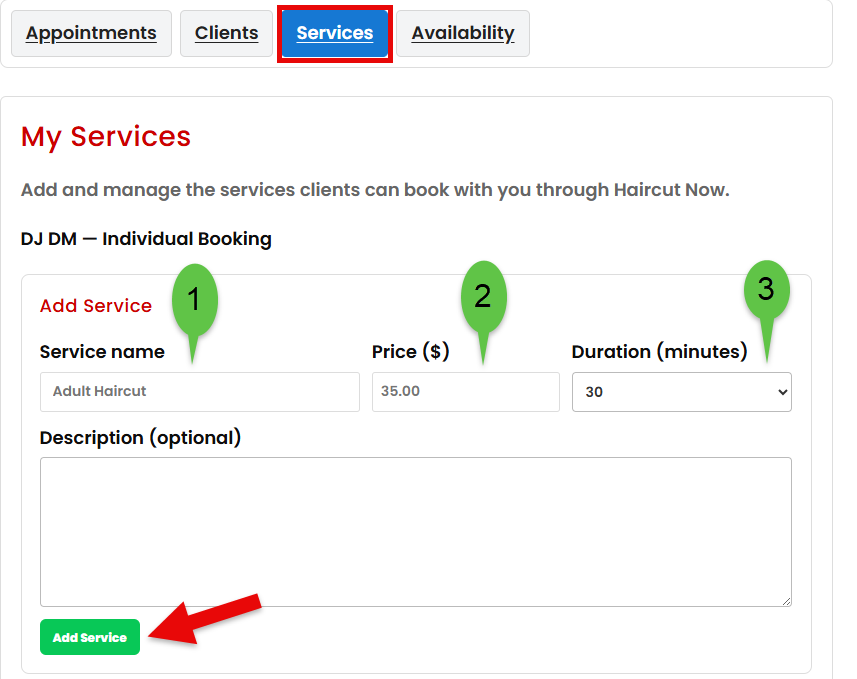
- Open your services.
- Choose the option to add a new service.
- Enter the service name.
- Enter the price.
- Set the appointment duration.
- Save the service.
Use clear service names that clients will immediately understand.
For example:
- Adult Haircut
- Haircut + Beard
- Kids Haircut
- Beard Trim
- Line Up
Choosing the right duration #
Give yourself enough time to complete the service without rushing.
If a haircut normally takes 30 minutes, don’t set it to 20 minutes just to create more appointment openings.
Your appointment duration affects the times that clients can book.
Updating a service #
You can return to your services at any time to change the name, price, duration, or availability.
Changes normally apply to future booking availability and should not be used as a substitute for reviewing appointments that have already been scheduled.