If you run a booth-rent or independent-chair shop, the right barbershop online booking software should do more than collect appointments. It should fit the way your shop actually works: who can be booked, how walk-ins move, how rent is tracked, and how much admin time you still have to spend after closing.
Before you subscribe, use a practical checklist. The goal is to choose software that helps your shop take more bookings without forcing every barber into the same workflow, while still keeping your walk-in line and rent records organized.
Start with the booking workflow, not the marketing headline
Ask one simple question first: how does the customer booking flow actually work? In a shop setting, that means checking whether the software lets clients book the shop in a way that matches your operation, such as choosing a participating barber/stylist or selecting Any Available when that makes sense.
For Haircut Now Shop Complete, Shop Booking is the shop-wide online booking layer. That matters if you want one system for the shop instead of a separate tool for each chair.
What to verify
- Can clients book a specific participating barber/stylist?
- Can clients choose Any Available when you want the first open slot?
- Does the booking flow support multi-barber scheduling?
- Are confirmations and reminders included for booked appointments?
- Can the system handle recurring appointments if your shop needs that?
Separate scheduled bookings from the walk-in line
Many shop owners compare booking software and walk-in tools as if they were the same thing. They are not. A scheduled appointment system answers one job, while a walk-in queue answers another.
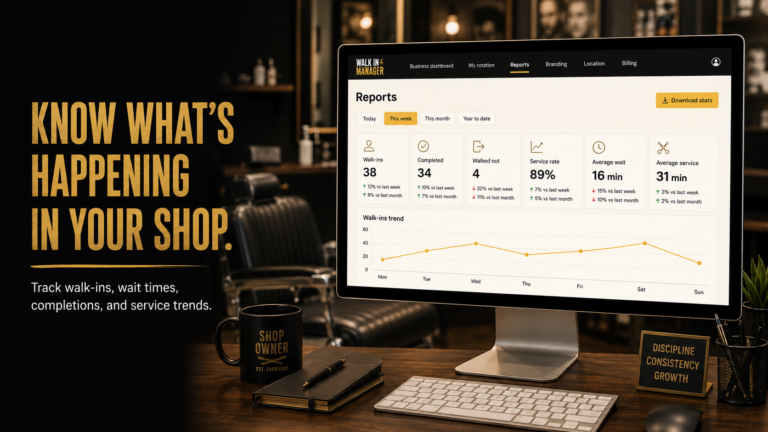
Shop Complete includes Walk-In Manager alongside booking. That gives you a separate customer kiosk for walk-ins and automated staff rotation for participating barbers/stylists. In practical terms, that helps reduce the routine queue work that can slow down a busy booth-rent shop when nobody is standing at the front desk all day.
When you evaluate software, make sure you know whether the product is handling:
- Scheduled bookings for future appointments
- Walk-in intake for customers who show up without booking
- Independent routing for the walk-in workflow versus the appointment workflow
A strong shop system should keep those workflows distinct so your booking calendar does not become a substitute for your walk-in process.
Check whether rent tracking is included or separate
In a booth-rent shop, the booking conversation should also include rent and balances. If your software ignores that side of the business, you may still end up juggling spreadsheets, notes, and payment reminders by hand.
Shop Complete includes Booth Rental Manager, which gives you a shop rent ledger with rental agreements, balances, a received-payment ledger, credits, corrections, and applicable late fees. That is useful for owners who want booking, walk-ins, and rent records under one roof without forcing everyone into the same payment setup.
When you compare products, ask:
- Can the system track rental balances and payments?
- Can it record credits or corrections when needed?
- Can it show rent activity in a way an owner can review quickly?
- Does it separate rent tracking from client booking so each part stays clear?
Look at notifications and reminders as an operations tool
Booking software should help you reduce no-shows and reduce manual follow-up. For shop owners, reminders are not just a nice extra; they change how many texts, calls, and last-minute schedule questions your team has to handle.
With Shop Booking in Shop Complete, confirmations and reminders are part of the booking workflow. That is helpful when you are trying to keep your shop organized across several participating professionals.
General advice: decide in advance what kind of reminder system you want to use, how far ahead clients should be notified, and whether recurring appointments matter for your clientele. Those business decisions should guide the software choice, not the other way around.
Confirm how the software supports your shop model
Shop Complete is built for booth-rent and independent-chair businesses, where each professional keeps their own client relationships, payment methods, outside booking apps, and business identity. That matters because a good shop package should support the shop as a whole without flattening every barber into the same system.
If you own the shop, make sure the software fits your actual structure:
- Unlimited participating team members/renters without per-person subscription fees
- One owner, one location
- Shop-wide booking for participating professionals
- Walk-in automation that works separately from scheduled appointments
- Rent ledger tools for booth-rent accounting
That combination can save time because you are not stitching together a booking app, a separate walk-in tool, and a rent spreadsheet just to run one shop.
Make sure outside tools still fit your day-to-day
Many independent barbers already use their own booking tools or payment methods. When you evaluate software, ask whether the new system is meant to replace those tools or simply support the shop layer.
With Shop Complete, participating professionals can keep their own outside booking apps and business identity. That makes it easier to add shop-wide booking and walk-in organization without forcing a full reset of how each barber works with their own customers.
For owners, that balance can be the difference between adoption and resistance. A system that respects independence is often easier to roll out in a booth-rent environment.
A simple purchase checklist before you subscribe
Use this checklist before you start a trial or move a shop over:
- Does the booking flow match how your shop takes appointments?
- Can clients book a participating barber or choose Any Available?
- Does the system keep walk-ins separate from scheduled bookings?
- Can it track rent due, paid amounts, balances, and corrections?
- Will reminders and confirmations reduce admin work for the shop?
- Does it fit a booth-rent or independent-chair model without forcing a new identity on each professional?
- Is the pricing structure clear for your ownership setup?
At the current published rate, Shop Complete is listed at $69/month or $690/year with a 14-day trial. If you are evaluating whether that pricing makes sense, compare it against the cost of separate tools for booking, walk-ins, and rent tracking.
FAQ
Is barbershop online booking software enough for a busy shop?
It can be, if the booking system also fits your walk-in flow and your rent tracking needs. A shop owner should look at the whole operation, not just the appointment calendar.
Should I choose software that handles bookings and walk-ins together?
If your shop takes both scheduled appointments and walk-ins, having both workflows in one package can simplify operations. Shop Complete combines shop-wide booking with Walk-In Manager and Booth Rental Manager.
Do all booking systems include rent tracking?
No. That is why owners should ask specifically whether rent tracking is built in. In Shop Complete, Booth Rental Manager covers rental agreements, balances, credits, corrections, and the payment ledger.
Can I keep my barber’s outside booking tools?
Yes, if your shop chooses a system that supports that model. Shop Complete is built so participating professionals can keep their own outside booking apps and business identity while still using the shop package.
If you want shop-wide booking that fits booth-rent operations and connects with walk-ins and rent management, review the full package details here: Shop Complete.