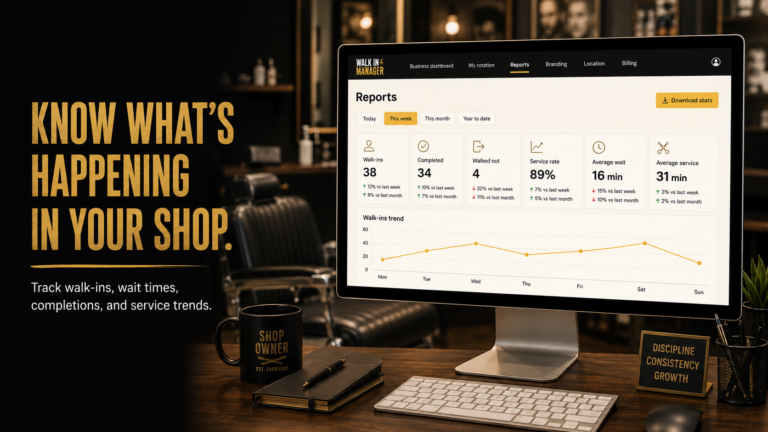
For a booth-rent shop, a truly hands off barbershop operations routine starts with setup, then gets out of the way. Once your rules are in place, Walk-In Manager can handle the day’s walk-in flow while your barbers self-check in and manage their own readiness, and Booth Rental Manager keeps the rent record current in the background.
If you’re running a chair-rental location without wanting to hover over a desk all day, the goal is simple: keep the shop moving, protect each independent barber’s workflow, and reduce the manual coordination that eats up your opening hour. That is exactly where Shop Operations fits. See current Shop Operations pricing and start your trial.
What a hands-off opening routine looks like
A good opening routine in a booth-rent shop should be short, repeatable, and not depend on a receptionist being present at the front desk. With Shop Operations, the owner sets up the system once, and the daily walk-in process can run from there with minimal day-to-day intervention.
In practical terms, the shop owner or manager handles the initial configuration. After that, barbers/stylists check themselves in, and the automated walk-in flow begins when a customer enters their name at the kiosk. The system then offers the walk-in to the next eligible checked-in team member in fair round-robin order.
Why this works well in booth-rent shops
Booth-rent shops are different from a traditional employee shop. The professionals often keep their own clients, their own tools, and their own payment methods. That independence is part of the model, so your operations software should support it instead of forcing everyone into a single, rigid workflow.
Shop Operations is built around that reality. It combines two operational tools in one account: Walk-In Manager for the walk-in side of the shop, and Booth Rental Manager for rent tracking. That makes it useful when you want less manual coordination without changing how independent barbers run their own business day to day.
Delegate the walk-in flow after setup
Once setup is complete, the opening routine can be lean:
- Owner/manager: set up the shop rules and participating staff once.
- Barber/stylist: check in when ready to receive walk-in offers.
- Customer: enters their name at the kiosk.
- Automated system: sends the offer to the next eligible checked-in barber/stylist.
- Barber/stylist: taps Accept or Pass on the mobile offer.
That structure helps owners avoid standing in the middle of every turn. The daily rotation can continue without regular receptionist work, and the shop can keep moving even when the front desk is busy.
What happens when someone passes or misses an offer
In the real shop flow, a barber/stylist can Pass on a walk-in offer, and the system advances the queue automatically. If an eligible team member does not answer, the system waits for the owner-configured time window and then marks that person Busy before moving on.
That is useful in a booth-rent environment because it lets each independent professional stay in control of their own availability while the shop stays orderly. The barber can tap Ready when they want to receive offers again.
What happens when a customer leaves
If a customer walks out, a barber/stylist can tap Walked Out and the system handles the queue. That keeps the front-of-house process moving without forcing the owner to manually reshuffle every time a walk-in changes plans.
Keep rent recordkeeping separate from walk-in traffic
Booth Rental Manager serves a different purpose from Walk-In Manager. It tracks independent booth-rent agreements, balances, and externally received payments. That means the owner can keep a clean rent ledger without turning the shop into a payroll system or trying to fold rent into the walk-in workflow.
For a booth-rent owner, that separation matters. Walk-ins and rent are both important, but they are not the same operational task. One tool helps the shop run the chair flow; the other helps you stay organized on the financial side of rental agreements.
What the owner still controls
Hands-off does not mean unstructured. It means the owner defines the setup, then lets the system carry out the routine work.
- Choose which barbers/stylists participate in walk-in offers.
- Set the owner-configured timeout for unanswered offers.
- Keep rent agreements and balances organized in Booth Rental Manager.
- Review activity or step in occasionally when needed.
That balance is especially helpful if you want to preserve the independence of each chair renter while still running a coherent shop operation. The system supports the shop owner’s structure instead of replacing it.
How this reduces opening-hour friction
General shop advice: most opening-day problems come from small delays piling up — someone is late checking in, a walk-in waits too long for a response, or rent details are buried in messages and paper notes. A simple digital routine reduces those interruptions.
With Shop Operations, the owner does not need to micromanage the queue to keep the shop moving. Once barbers check themselves in, the automated round-robin flow can keep offers moving across eligible participants. Meanwhile, Booth Rental Manager keeps rent records organized in the same account, so the owner is not chasing separate systems just to understand who owes what.
Who gets the most value from this setup
This bundle is a strong fit for owners and managers of independent-chair shops who want one place for the two core operational jobs that often take up the most time:
- Running walk-ins fairly across participating barbers/stylists
- Tracking booth-rent agreements and received payments
It is also useful when your shop already uses an outside appointment solution for clients. In that case, you can keep your existing appointment setup and still add these shared operations tools for the shop floor.
FAQ
Does Shop Operations require a receptionist to run every day?
No. The owner sets it up, barbers/stylists check themselves in, and the walk-in process runs automatically from there.
Can the system handle walk-in offers without manual reassigning?
Yes. The automated flow sends the offer to the next eligible checked-in barber/stylist, and the queue advances when someone passes or does not respond in time.
Does Booth Rental Manager collect rent automatically?
No. It tracks rent agreements, balances, and externally received payments so the owner can stay organized.
Can independent barbers still keep their own clients and payment methods?
Yes. The shop’s barbers retain their personal clients, tools, and payment methods.
Can a shop keep its existing appointment solution?
Yes. Shop Operations is designed to work alongside an existing independent appointment solution while adding the walk-in and rent tools.
If your goal is a cleaner opening routine with less front-desk juggling, Shop Operations gives a booth-rent shop a practical way to delegate the repetitive parts and keep the day organized.