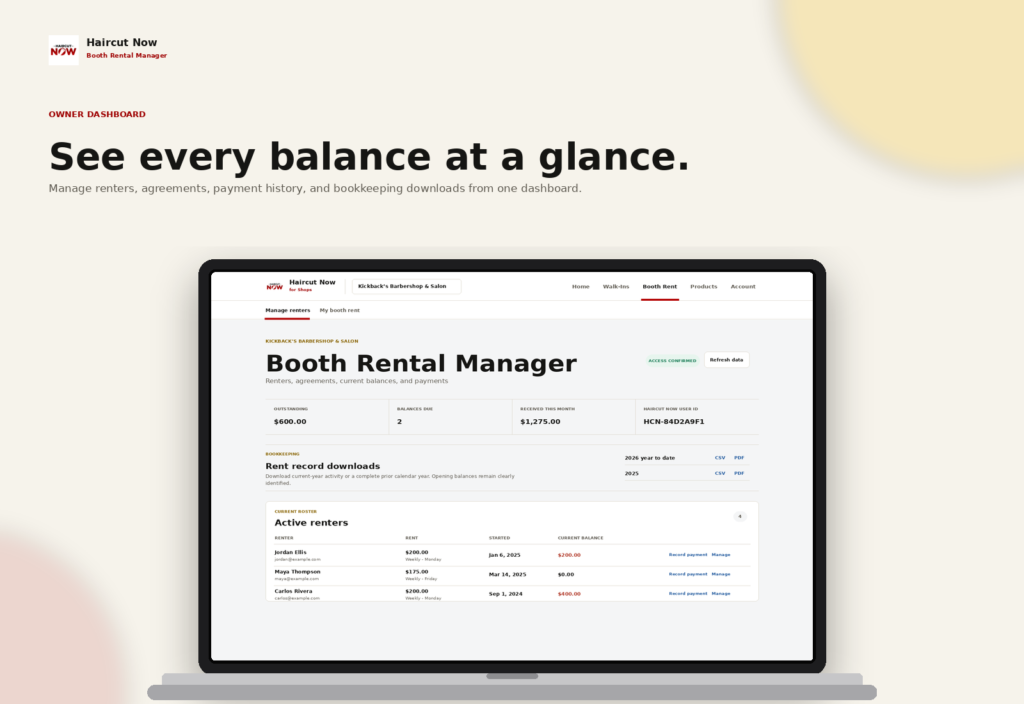
If you manage a booth-rent shop, the fastest way to lose time is by chasing payment notes across texts, paper slips, and memory. Booth Rental Manager gives you one shared rent ledger so you can record booth rent payments from cash, Zelle, Cash App, Apple Pay, Square, and other methods while keeping renters independent and the ledger organized.
That matters when your barbers and stylists pay through their own channels and you still need a clean way to see what was received, what is still outstanding, and what each renter owes under their agreement. The result is less manual back-and-forth for you and a clearer view of the rent picture across the whole shop.
Record payments without changing how renters already pay
In a booth-rent setup, the money often moves outside the shop’s own software. One renter may send Zelle, another may pay cash, and someone else may use Cash App or Square. Booth Rental Manager is built for that reality: it records the payment details and the balance, while the renter keeps paying through their existing method.
That makes the ledger useful for independent barbers and salon renters who want to keep their own client business and payment habits. It also helps owners and authorized managers avoid the “Who paid, how much, and when?” scramble that can happen when rent is tracked in messages instead of one place.
How the shared rent ledger works in a real shop
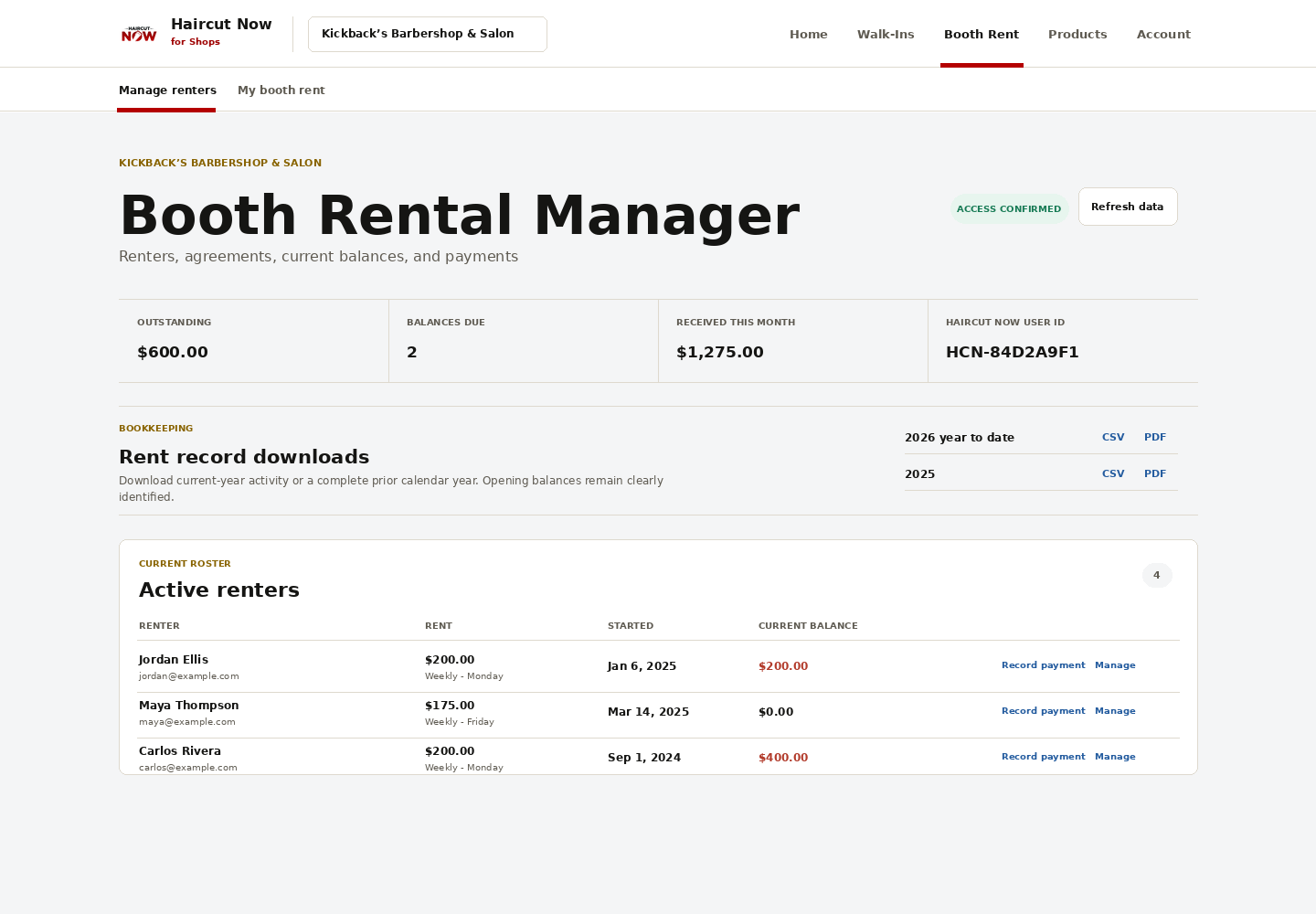
Owners or authorized managers add renters and set up weekly, biweekly, monthly, or one-time rental agreements with the amount, start date, and terms. From there, the ledger shows shop-wide balances, outstanding amounts, credits, payments, and corrections in one view.
For a booth-rent owner, that means you can check the whole shop at a glance instead of rebuilding rent status renter by renter. For the renter, it means a private mobile-friendly view of their own agreement, charges, recorded payments, and balance.
A practical workflow you can use each week
- Set each agreement once. Enter the rent amount, schedule, start date, and any terms that apply to that renter.
- Record received payments as they come in. Log cash, Zelle, Cash App, Apple Pay, Square, or another received method when payment arrives.
- Match the amount to the agreement. Use partial payments, credits, or corrections when the payment does not match the full amount exactly.
- Review balances before follow-up. Check outstanding amounts and late fees so you know what is due without piecing it together from messages.
- Export statements when needed. Use PDF or CSV exports for current-year or prior-year bookkeeping.
This workflow is especially helpful in independent shops where the owner may also be cutting hair, handling walk-ins, or managing the business side between clients. The ledger keeps rent tracking separate from your daily service work.
Renter-reported payments and owner confirmation
Booth Rental Manager supports a simple confirmation flow that fits booth-rent communication. Renters can report payments for owner or manager confirmation, and owners can also record payments directly.
That gives both sides a clear record without turning the shop into a payment processor. The renter can note that payment was sent or delivered, and the owner or authorized manager can confirm receipt in the ledger. This is especially useful when different renters use different payment methods and you want one consistent record of what the shop received.
Good habits that keep the ledger clean
- Use the same naming convention for every renter so records stay easy to scan.
- Record payments as soon as they are received or confirmed.
- Use corrections only when a previous entry needs to be adjusted.
- Apply late fees consistently according to the agreement terms you entered.
- Review credits and outstanding balances before you send reminders.
Those are general bookkeeping habits, but they work especially well when your rent ledger is shared between the shop owner and independent renters.
What owners and managers gain from a shared rent ledger
For shop owners, the main benefit is visibility. You can see who owes what, who has paid, what was recorded, and whether any credits or late fees affect the balance. For booth-rent managers, the benefit is consistency: one ledger, one set of renter records, and fewer loose ends.
Because renters have their own private views, they can check their agreement and balance without asking the owner to rebuild the numbers every time. That privacy is a strong fit for independent professionals who want to keep their business details organized while staying on top of rent.
If your shop has several chairs and a mix of weekly and monthly renters, the ledger can be a practical anchor for rent day. You can see the shop-wide picture, while each renter sees only their own records.
Bookkeeping exports that save time later
Another useful part of the system is exportability. Booth Rental Manager can export current-year or prior-year statements in PDF or CSV format, which gives you a straightforward way to keep rent records for bookkeeping.
That is helpful whether you work with a bookkeeper, keep your own records, or simply want a cleaner year-end review. Instead of assembling statements manually from scattered notes, you can pull the rent history from the ledger itself.
Who this is best for
Booth Rental Manager is a strong fit for independent booth-rent barbershops and salons that want a purpose-built way to record rent payments without changing how renters pay. It is also useful for owners who want one place to track balances, credits, partial payments, corrections, and late fees across the shop.
If you also use Walk-In Manager, the products can combine as Shop Operations, which can help a shop manage walk-ins and rent tracking together. But for this article’s purpose, the key value is simple: your rent ledger stays clear while renters keep their own payment methods and independence.
FAQ
Does Booth Rental Manager process the money?
No. It records payments and balances in the ledger. Renters keep paying through their existing methods, and the shop records what was received.
Can renters see their own rent status?
Yes. Renters have private, mobile-friendly views of their agreements, charges, recorded payments, and balances.
Can I record cash, Zelle, and Cash App payments?
Yes. The ledger records cash, Zelle, Cash App, Apple Pay, Square, and other received payment methods.
Can a renter report a payment for confirmation?
Yes. Renters can report payments for owner or manager confirmation, and owners can also record payments directly.
Can I export records for bookkeeping?
Yes. You can export current-year or prior-year statements as PDF or CSV.
See how a shared rent ledger can simplify your shop: visit Booth Rental Manager.